How to break software? - 15

[Me] :- Let’s look at various attacks through the operating system?

[Guruji]:- ok, while we do that let’s exclude the file system.

OS attack # 1

Exhaust the amount of physical memory

·         Does the application handle cases when no more free memory is available on the heap?

·         C/C++ coders:  When was the last time you checked if your “new” call returned null?

·         Can also test under varying amounts of memory or generating other memory faults

OS attack # 2

Inject Network Faults

·         Explore network traffic, load on a particular port, or loss of services (e.g. network is down, port unavailable)

·         Useful to examine performance

·         E.g., on versions of IE can lose current page if network shut down

Some of these system faults are difficult to generate, e.g.

·         Out of memory

·         Locked memory

·         Out of disk space

·         CRC errors

[Me] :- Do any tools exist to simulate the system software

 [Guruji]:- yes, Tester can inject faults of choosing

·         Ex. Canned HEAT or Holodeck from Florida Institute of Technology

Virtual machine, e.g. VM Ware of Virtual Server

How to break software? - 14

[Guruji]:- System Attack # 4

Assign an invalid file name

·         File names often restricted by the file system, or can exploit common standards used by the file system (long names, weird characters, etc.)

System Attack # 5

Vary file access permissions

·         Can uncover subtle bugs if apps might require most general permissions

·         Example: Web server app may not function properly unless “all” permission set to readable, but then this might compromise security

System Attack # 6

Vary or corrupt file contents

·         Simulates data being modified intentionally (perhaps maliciously) or incidentally (e.g., during transmission).  Many apps may not check for an error code

[Continued in the next day’s post]

How to break software? - 13

[Guruji]:-  System Attack # 2

Force the media to be busy or unavailable

·         A resource may be unavailable in a multi-tasking operating system

·         Does the app wait, lock, or ?

·         Typically we can look at issues such as delayed response times; may need to put up appropriate delay error messages

System Attack # 3

Damage the media

·         Useful for software that should work despite damaged media, or software that should at least detect that there was a problem with the file

·         Dust, dirt, scratches, magnetic scrambling


[Continued in the next day’s post]

How to break software? - 12

[Me] :- That was really helpful. So what are the System Interface Attacks?

[Guruji]:- ok, First let’s look at attacks through the file system. The Inputs from the file system similar to inputs from the user, but often even worse since many apps expect user input to be weird, but files often expected to be consistent with some specified format. And there are some Media Based Attacks wherein we simulate problems with the storage media, e.g. failure in the disk. There is this File Based Attacks where there are Problems with properties of a particular file.

[Me] :- Wow!!! Can you help me with examples like what you did in the previous attacks?

[Guruji]:- Hmn… Sure.

System Attack # 1

Fill the file system to its capacity

·         Has the developer tested for this potential problem? 

·         A crash would be undesirable when the user has the chance to free up some space to allow execution to continue

[Continued in the next day’s post]

How to break software? - 11

[Guruji]:- User interface attack # 14

Experiment with invalid operand and operator combinations

·         Verifies that computations do not take place with incorrect or invalid data, that the software accounts for more global exception handling

·         Ex: divide by zero

·         Example: Windows calculator.  Take square root of 4 (inverse x2).  Then square and subtract 4.  Don’t get zero!  (close, though).  Windows hides the floating point format in rounding the number


User interface attack # 15

Force a function to call itself recursively

·         Checks if developer correctly handles the termination case and whether or not an object can interact with itself

·         Can manifest itself as an infinite loop

·         How to conduct: Find recursive calls and test if there are ways to invoke them

User interface attack # 16

Find features that share data or interact poorly

·         These are candidates for errors with integration, especially when we are mixing data types or creating new data structures

·         How to conduct: Look at shared features and ask if the same inputs can be applied to each feature in question

 [Continued in the next day’s post]

How to break software? - 10

[Guruji]:- User interface attack # 12

Force a data structure to store too many or too few values

·         The overflow/boundary check problem for arrays or data structures

·         Even dynamic structures like lists or stacks have upper bounds

·         How to conduct : Read/write beyond size of allocated array or data structures

User interface attack # 13

Investigate ways to modify internal data constraints

·         More general form of previous attack; rather than concentrate on overflowing size, investigates violating any constraint (e.g. dimension, location on screen, etc.)

·         How to conduct:  Look for constraints and see if there are any ways to access ways to violate them

 [Continued in the next day’s post]

How to break software? - 9

[Guruji]:- User interface attack # 10

Force the screen to refresh

·         There are often errors with refresh events where not everything is repainted correctly

·         How to conduct: resize, minimize, drag objects about so they are overlapping

User interface attack # 11

Apply inputs using a variety of initial conditions

·         Search for a configuration where internal data is incompatible with the inputs and input sequences

 [Continued in the next day’s post]

How to break software? - 8

[Guruji]:- User interface attack # 8

Force invalid outputs to be generated

·         Similar to attack #7, but focusing on invalid outputs

·         One key ingredient is often input sequencing to generated the invalid output

·         Example:  Feb 29, 2001 possible on Windows NT date/time clock if Feb 29 selected on a valid date (leap year) then change year to 2001

User interface attack # 9

Force properties of an output to change

·         Gives testers a way to think about persistent outputs; outputs that hang around on the screen or file can be updated in ways to break the software

·         How to conduct: Set properties to one value, then try changing to something else

 [Continued in the next day’s post]

How to break software? - 7

[Guruji]:- User interface attack # 6

Repeat the same input or series of inputs numerous times

·         Applicable when input received within a loop.  May consume resources or cause data initialization problems. 

·         Example : memory leak, chunk of allocated memory not released

User interface attack # 7

Force different outputs to be generated for each input

·         This checks if all major behaviors associated with each input are tested

·         How: A single input often causes different outputs depending on the context

·         Example: picking up the phone when someone else is on the line, vs. idle

 [Continued in the next day’s post]

How to break software? - 6

[Guruji]:- User interface attack # 4

Overflow input buffers

·         Exceeding array or structure size will cause a crash

·         How: input long strings or other data beyond “normal” size

Such bugs are more serious in a server or other component that could be exploited to run arbitrary code

User interface attack # 5

Find inputs that interact and test combinations of their values

·         Check to see if integration testing has been adequately performed

·         How to carry out: identify candidate processes that are normally separate, but through some interaction may share a common data structure

 [Continued in the next day’s post]

How to break software? - 5

[Guruji]:- User interface attack # 3

Explore allowable character sets and data types

·         Example, in an input string, try NULL character or other characters that might be used as delimiters

·         Unix uses ^D as text end-of-file, program might terminate or behave unpredictably

·         In some bugs, shell command strings can be sent

 [Continued in the next day’s post]

How to break software? - 4

[Guruji]:- User interface attack # 2

Apply inputs that force the software to (re) establish default values

  • ·         If software tries to use a variable before it is initialized to a proper value, the software will fail

  • ·         How to carry out: Change default values, enter null values, enter legit values and switch to null values

 [Continued in the next day’s post]

How to break software? - 3

[Me] :- Cool, let’s start with the User Interface attacks

[Guruji]:- Ok, Black box user interface attack # 1

Apply inputs that force error messages to occur

·         Basic test to ensure that software responds appropriately to bad input

·         Ensures developers wrote code to handle erroneous input, something that is often not in their mindset

·         How to carry out:  explore input types, length, boundary values

[Continued in the next day’s post]

How to break software? - 2

[Me] :- Whats with the black box and open box technique?

[Guruji]:- Black box techniques deal with attacking a system while varying the inputs and outputs

[Me] :- And the open box?

[Guruji]:- It involves exploring stored data, computation and feature interaction.

[Me] :- Wow, this testing is like studying for Ph.D, the more you learn, the more you realize that there is much more to know.

[Guruji]:- J


[Continued in the next day’s post]

How to break software? - 1

[Me] :- Guruji, please tell me how to break and attack software?

[Guruji]:- Hmn.. Even though it’s a very basic question you have asked, I am sure that there are very few people who know the tricks. I am glad you asked. Testing is not something that one can master, you always have something new to learn.

[Me] :- J

[Guruji]:- To break software we need to attack the software from various perspectives.

[Me] :- Oh , how difficult can we get

[Guruji]:- Ok, let’s analyze the attacks. You could subject a system to

·         User Interface attacks  - comprising of black box & open box techniques

·         System Interface attacks – comprising of File system & Operating systems

[Me] :- Wow!!! I did not know all these, all I did was pound the application whenever I was handed one.

[Guruji]:- That’s the subtle difference between a tester and good tester. A good tester always analyses

[Continued in the next day’s post]

Test cases for Black box

[Me]:- Guruji, I am beginning to write some test cases for my project, what techniques can I adopt to maximize the coverage?

[Guruji]:- If it’s a black box testing,the test cases can be generated by using any or all combinations of Graph based, Error Guessing, Boundary value analysis, Equivalence partitioning , Comparison testing and Orthogonal Array testing.

[Me]:- Sounds Complex!!! Can you give me some insights on Graph Based software testing?

[Guruji]:- Graph Based Software testing begins by creating a graph of important objects and their relationships and then devising a series of tests that will cover the graph so that each objects and their relationships and then devising a series of tests that will cover the graph so that each object and relationship is exercised and error is uncovered.

[Me]:- I have heard BVA & EP as a good techniques?

[Guruji]:- Boundary Value Analysis (BVA) is a test data selection technique (Functional Testing technique) where the extreme values are chosen. Boundary values include maximum, minimum, just inside/outside boundaries, typical values, and error values. The hope is that, if a system works correctly for these special values then it will work correctly for all values in between. Equivalence partitioning is a testing method that divides the input domain of a program into classes of data from which test cases can be derived.

[Me]:- Are there are any more techniques?

[Guruji]:- Comparison Testing - There are situations where independent versions of software be developed for critical applications, even when only a single version will be used in the delivered computer based system. It is these independent versions which form the basis of a black box testing technique called Comparison testing or back-to-back testing.The Orthogonal Array Testing Strategy (OATS) is a systematic, statistical way of testing pair-wise interactions by deriving a suitable small set of test cases (from a large number of possibilities).

And yes, there is one technique called Error Guessing. Error Guessing comes with experience with the technology and the project. Error Guessing is the art of guessing where errors can be hidden. There are no specific tools and techniques for this, but you can write test cases depending on the situation.

Testing Types & Testing Techniques

[Me]:- Guruji, what’s the difference between testing types and testing techniques. I find a lot of confusion.

[Guruji]:- Testing types deal with what aspect of the computer software would be tested, while testing techniques deal with how a specific part of the software would be tested. That is, testing types mean whether we are testing the function or the structure of the software. In other words, we may test each function of the software to see if it is operational or we may test the internal components of the software to check if its internal workings are according to specification. On the other hand, 'Testing technique' means what methods or ways would be applied or calculations would be done to test a particular feature of a software  (Sometimes we test the interfaces, sometimes we test the segments, sometimes loops etc.)

Stop Testing

[Me]: - Guruji, Time and again the most important question that always haunts me is - when are you stopping your test? Can you throw some pointers?
[Guruji]:- Well' there is no right or wrong answer for this. But definitely you can concur at the time to stop testing using these items
1. All high priority bugs are fixed
2.The bug convergence shows good result
3. ZBB ( Zero Bug Bounce) has been achieved
4.The testing budget is achieved
5.The project duration is completed :-)
6. The risk in the project is under acceptable limit
practically item # 6 would be the main and most acceptable solution to stop testing.  Now what risks need to be monitored for these answers? . I would go with - Test coverage, Number of test cycles & priority of open bugs

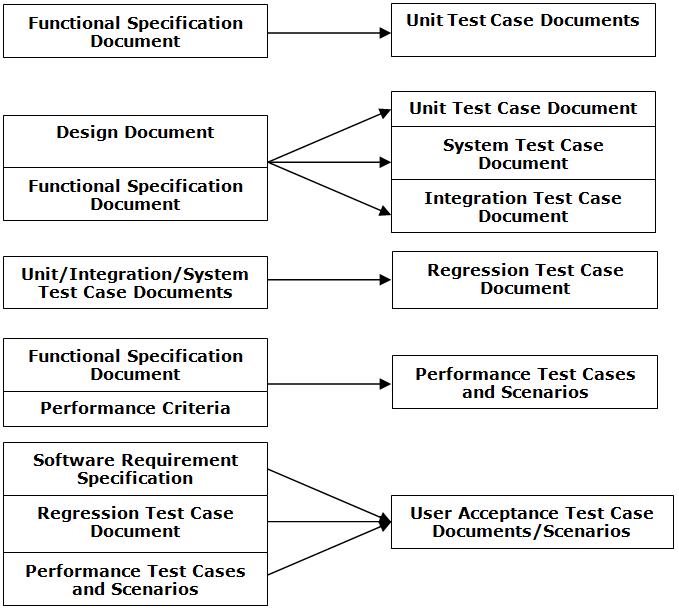
Deliverables @ various phases

This diagram does not depict when and where are the test plan and test strategy documents generated.Ideally, these documents are ready before you begin the test activities

test Deliverables @ phases

Test Activities during phases

[Me]:- Guruji, We all know that Test activities varies with the model and also the type of project. So is there a generic list of items which we can safely follow.

[Guruji]:- Yes, You can always do it at any point when enough data is available

Requirement Phase

· Invest in analysis at the beginning of the project

· Start developing the test set at the requirement analysis phase

· The correctness, consistency and completeness of the requirements should be analyzed.

Design Phase

· Analysis of design to check its completeness and consistency

· Analysis of design to check whether it satisfies the requirements

· Generation of test data based on design

· Setting up of test bed

Programming/Coding Phase

· Check code for consistency with design

· Perform system testing in an organized manner - Buddy testing, feature testing, integration testing, System testing etc

· Use available tools

· Apply stress to the program

· Test one at a time

· Measure test coverage

Maintenance Phase

· Retest/Regress

www.CodeNirvana.in

Powered by Blogger.

Translate

Total Pageviews

Copyright © T R I A G E D T E S T E R