Data driven tests using Xunit, Excel & Selenium

So, what is xUnit.net? xUnit.net is a unit testing tool for the .NET framework. For example, C# and VB.net. It was created by the original inventor of the NUnit testing framework and seeks to address some of the shortcomings of the NUnit framework in use. It's a free and open source framework, and it's licensed under the Apache Version 2 license.When we create tests with xUnit.net, we can run them with the Visual Studio 2012/2013 Test Runner, we can run them in Resharper, in CodeRush with TestDriven.NET, and we can also execute them from the command line. For updates on xUnit, you can follow xunit@jamesnewkirk or bradwilson on Twitter. And the home of the project is at xunit.codeplex.com.

So, with that background lets get started.

Create a class library project
Let's start by creating a class library project, targeting .NET 4.5 (or later). Open Visual Studio, and choose File > New > Project:

2. Extract and add the 2 dll’s as reference to your class project. Along with that you can also add the Selenium Webdriver if you have already downloaded or you can use the nuget package references for it.

image

3. Now you can go ahead and write your normal Selenium cases in the Xunit framework using the fixtures of Xunit , using either [Theory] or [Fact] .You can read more about this here

4. So, a simple usercase of gmail login is as follow

4. Now, if we want to make this test as data driven using Excel, we start off with first creating an excel data sheet. Let’s call it as SampleData.xls .

image

5. Create a named range in the excel sheet for the data. You can create the same by

  •    Highlight the desired range of cells in the worksheet and right click on it. Choose Define Name
  •   Type the desired name for that range in the name box, such as TestData

6. Once the named range is defined, we can save that as .xls and not .xlsx ( just ensure that it’s 2003 xls , for some reason, I never got it to work with .xlsx) in the solution folder. Also ensure that the properties of the excel is set to “copy always”

image

7. Now we need to add a new fixture below the [Theory] , called as [ExcelData] . The query statement implies that we select all data from the named range TestData. So the above code can be changed to data driven as below

8. Now, you can run these tests either using the Visual studio runner or the Resharper. There is another simple way to run the test. If you go to your Xunit folder where you downloaded the binaries from, you can see an exe – “xunit.gui.clr4.x86.exe” . You can launch this app, and point it to your dll from your debug folder and voila , the tests will run. ( Just remember to add the path to your environment variable)

9. In case you run into an error related to JetOLEDB,

Just change the Property of the project into x86 format

Project---> Properties--->Build--->Target Framework---> x86

TIPS:

Deleting a named range

  • Open Microsoft Excel, then click "File" and open the document containing the named range you want to delete.
  • Click the "Formulas" tab and click "Name Manager" in the Defined Names group. A window opens that contains a list of all the named ranges in the document.
  • Click the name you want to delete. If you want to delete multiple names in a contiguous group, press the "Shift" key while clicking each name. For names in a non-contiguous group, press "Ctrl" and click each name you want to delete.
  • Click "Delete," then confirm the deletion by clicking "OK."

Change a Named Range

  • Launch Microsoft Excel and open the file containing the name you want to replace.
  • Click the "Formulas" tab. Click "Name in Manager" under the Defined Names heading.
  • Click the name you want to replace, then click "Edit" in the Name Manager box.
  • Enter a new name for the range in the Name box. Change the reference for the name in the Refers To box. Click "OK."
  • Change the formula, constant or cell the name represents in the Refers To field in the Name Manager box.
  • Click "Commit" to accept the changes.

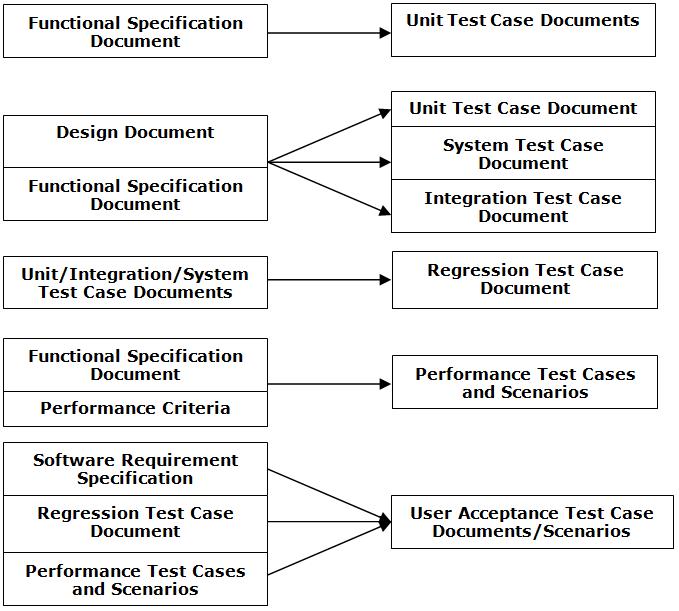
Deliverables @ various phases

This diagram does not depict when and where are the test plan and test strategy documents generated.Ideally, these documents are ready before you begin the test activities

test Deliverables @ phases

Test Automation Methodology

[Me] :- Guruji, what is the most common methodology to adopt while looking for an automation project.

[Guruji]:- There is quite a standard methodology if adopted will make your life easier while looking at automation for any project. For the sake of your understanding, I have listed the tasks and deliverables from the work packets

Tasks

Description

Deliverables

Identification of Automation Objectives/Test Requirements Study

Ø  Understanding the objectives of Automation for design of an effective test architecture

Test Automation Strategy Document

Ø  Understanding of the test requirements/application requirements for automation

Identification of Tool

Ø  Normally done in the proposal stage itself

None

Ø  Application of Tool Selection Process of eTest Center to arrive at the best fit for the given automation objectives

Script Planning & Design

Ø  Design of Test Architecture

Design Document

Ø  Identification of Reusable functions

Ø  Identification of required libraries

Ø  Identification of test initialization parameters

Ø  Identification of all the scripts 

Ø  Preparation of Test design document – Application of Naming Conventions

Ø  Test Data Planning

Test Environment Setup

Ø  Hardware

None

Ø  Software – Application, Browsers

Ø  Test Repositories

Ø  Version Control Repositories

Ø  Tool setup

Development of Libraries

Ø  Development of libraries

Phased delivery if applicable

Ø  Debug/Testing of libraries

Development of Scripts

Ø  Development of scripts

Phased delivery if applicable

Ø  Debug/Testing of scripts

Development of Test Suites

Ø  Integration of Scripts into test Suites

Test Suites & Libraries

Ø  Debug/Testing of Suites

Deployment/Testing of Scripts

Ø  Deployment of Test Suites

Test Run Results, Defect Reports, Test Report

Test Team deliverables

[Me]: - Guruji, I am very worried.

[Guruji]:- Stop worrying about the potholes in the road and celebrate the journey!

[Me]: - Well, sure I will try. But can you please tell me what are the deliverables that a Test team need to provide

[Guruji]:-  Hmnn…. This would be difficult. There are many deliverable a test team should provide and also at specific phases.  Again these phases  are very specific to organizations and the types of projects they indulge in.

[Me]: - I understand that. But surely there would be some guidelines for novice like me J

[Guruji]:- Yes, well a small guideline is made for you. Let me know if you need info

Phase

What is Done

Deliverable

Requirements Phase

Nail down product and project requirements(Functional specifications)

High Level QA  Plan (testing practices, tools, approach, standards, tools)

High Level Resource estimations based on Feature lists

Review Test Plan template and propose any changes

Design

Design the architecture and testing of the product (Design Documents and Test Plans)

Test Specs complete, reviewed and signed off

Bottoms up test schedules created and reviewed

BVTs and Automation designed

Security Testing Planned

Globalization/Localization Test Planned

Performance / Scale Testing planned

Implementation

Code the product/application (Code complete)

BVTs created and automated

All BVTs pass 100% on 100% of features

Basic end-to-end scenarios pass

Test cases defined

Release Criteria Created and Signed off

Verification

Stabilize the product (Stabilization/Technical Preview)

Test automation complete

Security test pass

Globalization / Localization Validation

First Performance and Soak Validation

Evaluate Code Coverage and add Cases where needed

Customer Support / help and Evaluation of problems found in field

Evaluate the product (Beta)

Review Test Coverage and enhance test sets where needed

Expansion of platform on which automation is run

Large Scale Deployment Validation

Design change Requests

·         Speclette Reviews

·         Test Planlette creation

·         Cost Estimation

·         Approval

·         Test Execution

Customer / Support and Evaluation of problems found in field

Documentation Reviews

Release Candidate

Produce Release candidate and drop to end users

Customer Support / Support and Evaluation of problems found in field

Continued automation

Ship the product (RTM, RTW, RTS)


Release Validation

Prepare for Sustained Engineering Handoffs

End of Life Process

Post-RTM – Clean up and distribution

Automation handoff to Sustained Engineering

Support Sustained Engineer

·         Regression support for enhanced feature request

·         Problem identification for problems found in field

www.CodeNirvana.in

Powered by Blogger.

Translate

Total Pageviews

Copyright © T R I A G E D T E S T E R